By Performate
k6 Scenario Types Explained with Practical Examples
Understand core k6 scenario types, the metrics that matter, and how Performate helps teams compare scenarios faster.
You picked ramping-vus because the tutorial did—but your product question is "can we sustain 500 orders per second?" Those are different workload models, and mixing them up produces confident charts that answer the wrong question.
k6 scenario types encode how virtual users or arrival rates behave over time—open vs closed models, steady load vs spikes, parallel journeys. In this guide you will learn the core executor families, when each fits API testing, and how to combine scenarios without drowning in configuration.
Why scenario type changes the answer—not just the graph shape
Every executor answers a different question about your system:
shared-iterations/per-vu-iterations: fixed iteration counts—good for deterministic regression suites, not open-world traffic.constant-vus/ramping-vus: closed model—a fixed pool of VUs loops as fast as possible; throughput rises when latency drops (executors reference).constant-arrival-rate/ramping-arrival-rate: open model—target requests per second regardless of response time; k6 adds VUs up tomaxVUsor drops iterations when saturated.- Parallel scenarios: run checkout and browse simultaneously with different executors—essential for API versioning mixes and multi-journey systems.
Think of executors as the dial on a shower: VU-based turns pressure up by adding nozzles; arrival-rate turns the main valve to a liters-per-minute target.
When the wrong executor hides saturation
Closed VU loops during a latency spike increase throughput artificially because faster iterations send more requests. Open arrival-rate executors expose saturation via dropped iterations and rising VU counts—signals your autoscaling should care about.
Pair executor choice with think time and ramping arrival rate docs when modeling mobile or BFF traffic.
Practical k6 implementation: three scenarios, one script
Combine executors in one options.scenarios block when production runs multiple journeys at once.
Example script (illustrative—not a production-ready test). Fictional URLs and rates—adapt to your SLOs.
What this example demonstrates:
- Smoke with
constant-vus: five VUs for two minutes—fast CI feedback. - Steady API load with
constant-arrival-rate: 30 req/s browse traffic—open model aligned with analytics. - Spike with
ramping-arrival-rate: checkout ramp for peak-event rehearsal. - Separate
execfunctions: each scenario calls the right journey withoutifspaghetti indefault.
import http from 'k6/http';
import { check, sleep } from 'k6';

const BASE = __ENV.API_BASE || 'https://staging.example.com';

export const options = {
  scenarios: {
    smoke: {
      executor: 'constant-vus',
      vus: 5,
      duration: '2m',
      tags: { scenario: 'smoke' },
      exec: 'healthCheck',
    },
    browse_steady: {
      executor: 'constant-arrival-rate',
      rate: 30,
      timeUnit: '1s',
      duration: '10m',
      preAllocatedVUs: 20,
      maxVUs: 100,
      tags: { scenario: 'browse', journey: 'catalog' },
      exec: 'browse',
    },
    checkout_spike: {
      executor: 'ramping-arrival-rate',
      startRate: 5,
      timeUnit: '1s',
      stages: [
        { duration: '2m', target: 40 },
        { duration: '5m', target: 40 },
        { duration: '2m', target: 5 },
      ],
      preAllocatedVUs: 30,
      maxVUs: 200,
      tags: { scenario: 'checkout_spike', journey: 'checkout' },
      exec: 'checkout',
    },
  },
  thresholds: {
    'http_req_duration{scenario:smoke}': ['p(95)<300'],
    'http_req_duration{journey:checkout}': ['p(95)<900', 'p(99)<1400'],
    http_req_failed: ['rate<0.01'],
    dropped_iterations: ['count==0'],
  },
};

export function healthCheck() {
  const res = http.get(`${BASE}/health`);
  check(res, { 'health ok': (r) => r.status === 200 });
  sleep(1);
}

export function browse() {
  const res = http.get(`${BASE}/catalog?page=1`, { tags: { route: 'catalog' } });
  check(res, { 'catalog 2xx': (r) => r.status >= 200 && r.status < 300 });
  sleep(0.4);
}

export function checkout() {
  const res = http.post(`${BASE}/checkout`, JSON.stringify({ sku: 'SKU-1', qty: 1 }), {
    headers: { 'Content-Type': 'application/json' },
    tags: { route: 'checkout' },
  });
  check(res, { 'checkout 2xx': (r) => r.status >= 200 && r.status < 300 });
  sleep(0.6);
}
Patterns that work
- Tag by scenario and journey so reports slice metrics per executor (observability tags).
- Monitor
dropped_iterationson arrival-rate executors—non-zero meansmaxVUsis too low. - CI smoke + nightly soak: lightweight
constant-vuson every merge; heavierramping-arrival-rateon schedule (CI/CD load testing). - Export scenario JSON from visual tools when non-developers tune rates.
Anti-patterns to avoid
- One
defaultfunction with runtimeif (peak)branches—split scenarios instead. - Copying tutorial
ramping-vusfor throughput questions—use arrival-rate when the question is req/s. - Ignoring
gracefulStopandstartTimewhen staggering scenario start order.
Pro tip (example command): list scenario timelines before a long run.
k6 inspect scenario-mix.js
What this command demonstrates: k6 prints scenario schedules and executor settings so you catch overlapping spikes before burning staging capacity.
Decision framework: which scenario type to pick
| Question you need answered | Recommended executor |
|---|---|
| "Did we break health on deploy?" | constant-vus smoke, 1–5 VUs, 1–3 min |
| "Can we hold 200 req/s on search?" | constant-arrival-rate with analytics-derived rate |
| "What happens during a 5× checkout spike?" | ramping-arrival-rate with staged targets |
| "Fixed regression iteration count?" | shared-iterations or per-vu-iterations |
| "Multiple journeys at once?" | Parallel scenarios with distinct exec and tags |
Use closed VU models if you simulate a fixed concurrent user population looping as fast as the UI allows.
Use open arrival-rate models if marketing or analytics speaks in requests per second and saturation must show as dropped iterations.
Use parallel scenarios if production never runs journeys in isolation—version mixes, mobile + web, or browse + checkout simultaneously.
Observability, documentation, and next steps
Scenario choice should be documented beside results:
- Record the business question each scenario answers—not only executor names.
- Capture
maxVUs, rates, and stage targets in run metadata for regression comparison. - Alert when
dropped_iterations> 0 on arrival-rate scenarios intended to be unsaturated. - Map scenario tags to dashboard filters ops already uses.
- Archive scenario JSON when rates change for seasonal events (peak traffic drafts).
How Performate simplifies comparing k6 scenario types
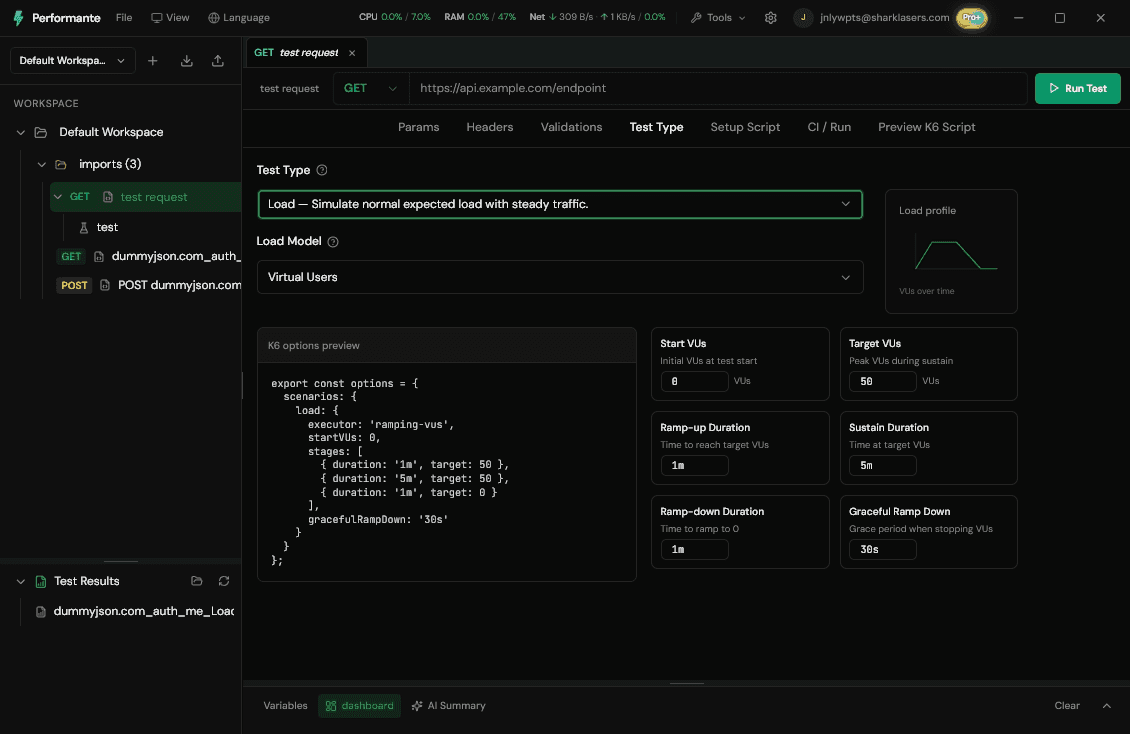
Visual setup reduces executor syntax errors. Below is a concrete workflow example for the smoke + browse + checkout mix above.
Example: three scenario types without hand-editing executors
- Import catalog and checkout requests from Postman or OpenAPI. Problem solved: journeys exist as named operations before you pick executors.
- Create a
smokescenario with constant 5 VUs for 2 minutes on/health. Problem solved: fast feedback without writing a separate script file. - Add
browse_steadywith constant arrival rate at 30 req/s for 10 minutes. Problem solved: open-model traffic matches analytics language. - Add
checkout_spikewith ramping arrival rate—5→40→5 req/s stages. Problem solved: peak rehearsal without copying stage arrays from docs. - Apply tags
scenario,journey, androutein the scenario panel. Problem solved: integrated reports match the k6 tag model above. - Compare runs side-by side in the report view and export k6 for CI. Problem solved: PMs tune rates visually; engineers gate merges with the same exported script.
That workflow maps to the cta: build and compare scenario types faster without executor syntax as the bottleneck.
Closing takeaway
Scenario type is the question you ask the system—not a cosmetic setting. Match executors to open vs closed workload models, tag every scenario, and watch dropped iterations on arrival-rate tests.
Pick one production journey this week, write the question in plain language ("hold X req/s" vs "Y concurrent users"), and choose the executor that matches—before tuning thresholds on the wrong graph.
Ready to optimize your API performance?
Build and compare k6 scenario types faster with Performate's visual scenario setup.